From your DAW to your phone, before you leave the room.
Bounce a mix from Logic, Ableton, Pro Tools or any other DAW into a folder on your Mac, and it's on your iPhone and in CarPlay as that song's next version. No AirDrop, no Dropbox, no emailing files to yourself.
How it works
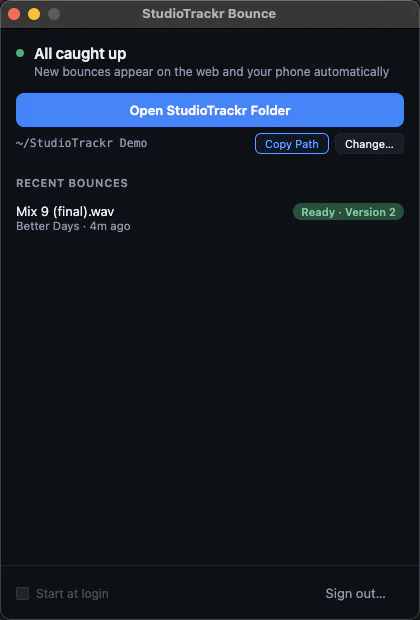
- Bounce. StudioTrackr Bounce keeps a StudioTrackr folder on your Mac, with a folder for every project and every song. Export from your DAW into the song's folder.
- Forget it. The menu-bar app uploads the file as that song's next version. If the wifi drops or you close the lid mid-upload, it keeps trying until the bounce is safely up.
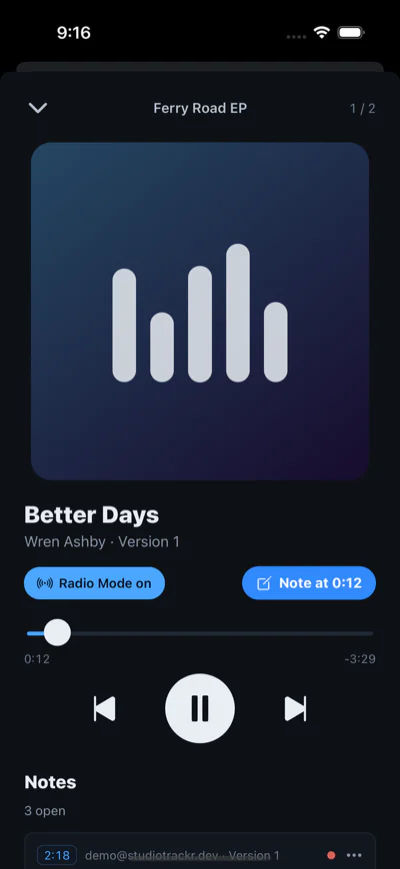
- Go listen. It's already on your phone. Play it, and tap to leave a note at the second something catches your ear.
Works with any DAW
StudioTrackr Bounce watches a folder, so it works with anything that can export an audio file: Logic Pro, Ableton Live, Pro Tools, FL Studio, REAPER, Cubase, Fender Studio Pro (formerly Studio One), Universal Audio LUNA, Bitwig, Reason and GarageBand. There's no plugin to install and nothing to set up inside the DAW. Just point the bounce at the song's folder.
Step by step for Logic Pro, Ableton Live, Pro Tools, FL Studio, REAPER, Cubase, Fender Studio Pro and LUNA.
It takes WAV, AIFF, FLAC, MP3, M4A, AAC and OGG. Uncompressed bounces are converted to 256 kbps AAC so they play instantly on your phone; on Pro, the original file is kept alongside it too.
Every bounce is a version, not a new file to name
The folder decides which song a bounce belongs to, so filenames don't have to mean anything. Bouncing Mix final final.wav twice gives you two versions, not one overwritten take. Each song keeps its versions in order, and the phone plays the current one.
The app only ever uploads. It never deletes, moves or edits anything you put in the folder.
On your phone
The StudioTrackr iPhone app plays the current mix of every song in the project in album order, with background playback and lock-screen controls, the way you'd actually check an album.
Every song can also play in Radio Mode: a level-matched, lightly polished copy rendered next to every bounce, so comparing Mix 7 to Mix 8 is about the music rather than which one went out louder. Flat is always exactly what left your DAW.
In the car
StudioTrackr is a CarPlay app. Your projects and songs are on the car's screen, and the note button asks "What's your note?", listens, and puts what you said on the song's punch list at the exact second you heard it. Notes are saved on your phone first, so a dead spot on the road doesn't lose one.
Away from the car, Siri takes a note too: "Hey Siri, mix feedback on StudioTrackr".
Back at the desk
Every note from the phone, the car or a bandmate lands on the song's punch list in the web app, tagged with the version and the second it's about. Fix it, resolve it, tick the step on the Studio Board, and the next bounce goes round again.
No Mac app? Use the browser
Both apps are optional. Drag a bounce into StudioTrackr in any browser and it suggests the song from the filename, then assigns the next version number. Your phone's browser plays mixes and takes notes too. Windows and Android apps are planned.
What it costs
Both apps are free and included on every plan, Free included. The Free plan runs a whole EP: one project, up to four songs. See pricing →