How to get a mix from REAPER to your iPhone
By Ryan Whitten · Updated October 2, 2026
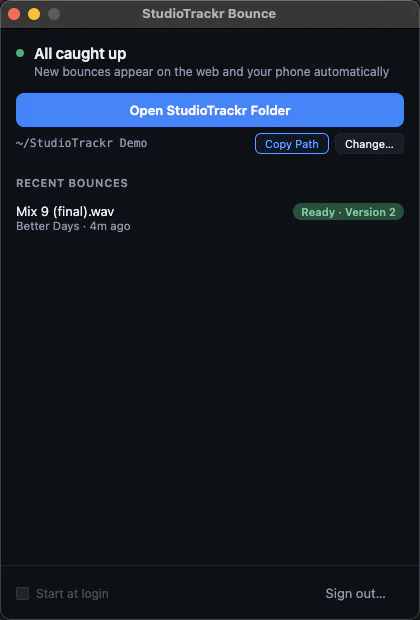
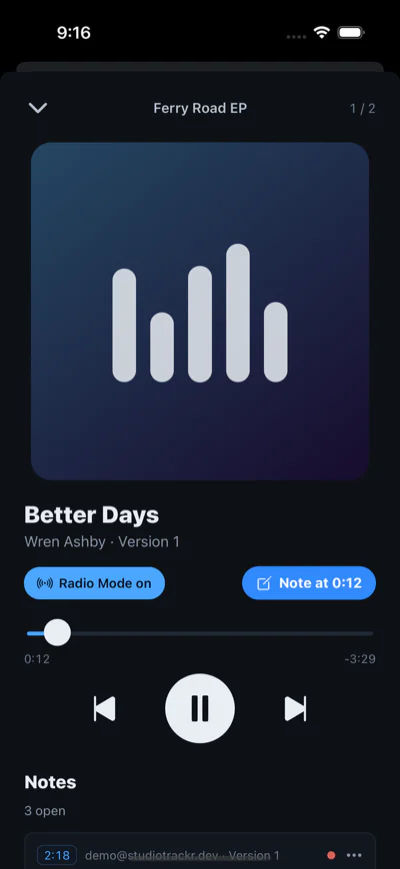
The quickest way to get a mix from REAPER to your iPhone is to export it into the song's folder in StudioTrackr Bounce for Mac. It uploads as that song's next version and plays on your phone, in album order with the rest of the project, before you've left the room.
Export the mix from REAPER
- Choose File > Render.
- Set Source to Master mix and Bounds to the entire project, or the time selection you want.
- Click Browse next to Directory and choose the song's folder inside your StudioTrackr folder, then set the File name.
- Choose WAV, 24-bit, at the project's sample rate.
- Click Render.
REAPER tips
Leave normalization and the limiter in REAPER's Postprocess options off for mix revisions, so two versions you compare keep their real levels. StudioTrackr's Radio Mode does the level-matching for listening, and Flat stays exactly what you rendered.
Rendering every song at the end of a session? Add to render queue lets you line up each song's render, each with its own directory, and run them all at once. Turn off Add rendered items to new tracks unless you want the render back in the project.
What happens next
StudioTrackr Bounce sees the new file, uploads it as the song's next version, and it's on your iPhone, on the lock screen and in CarPlay. Filenames don't matter: the folder decides the song, and bouncing the same name twice gives you two versions, not one overwritten file. If the wifi drops, it keeps trying until the mix is up.
Listen, tap to leave a note at the second you hear something, and the note lands on the song's punch list for your next session in REAPER. How it works →
First time?
- Start a free StudioTrackr project and add your songs.
- Download StudioTrackr Bounce for Mac and sign in. It creates the StudioTrackr folder with a folder for each song.
- Install StudioTrackr on your iPhone from the App Store.
Comparing other ways to get a mix onto your phone, like Apple Music sync, AirDrop or Dropbox? How they stack up →