How to finish an album when you never finish anything
By Ryan Whitten · Updated October 2, 2026
Most albums don't stall because the songs aren't good enough. They stall because nobody can see the whole thing, nothing says what "done" means, the mixes pile up unnamed, and the notes from the car never make it back to the desk. Fix those four and the album gets finished.
For fifteen years I sat on my own songs, stuck on details that didn't matter. What finally got my first album out was learning to commit to a decision and move on, and a system that made the next decision obvious. This is that system. It works on paper, in a spreadsheet, or in StudioTrackr.
1. Decide what "done" means for every song
Write down the steps a song goes through, in order, from first demo to ready for master. For a typical home-recorded album or EP: write, demo, drums, bass, guitars, keys, vocals, harmonies, editing, rough mix, mix, revisions, car test, master. When every step on a song is done, the song is done. Not when it feels done.
Keep the list short. Every step you add is a box on every song until you deal with it, so only add steps most songs need, and mark the ones a song doesn't need as not needed straight away. The album production checklist has a full list to start from.
2. Put the whole project where you can see it
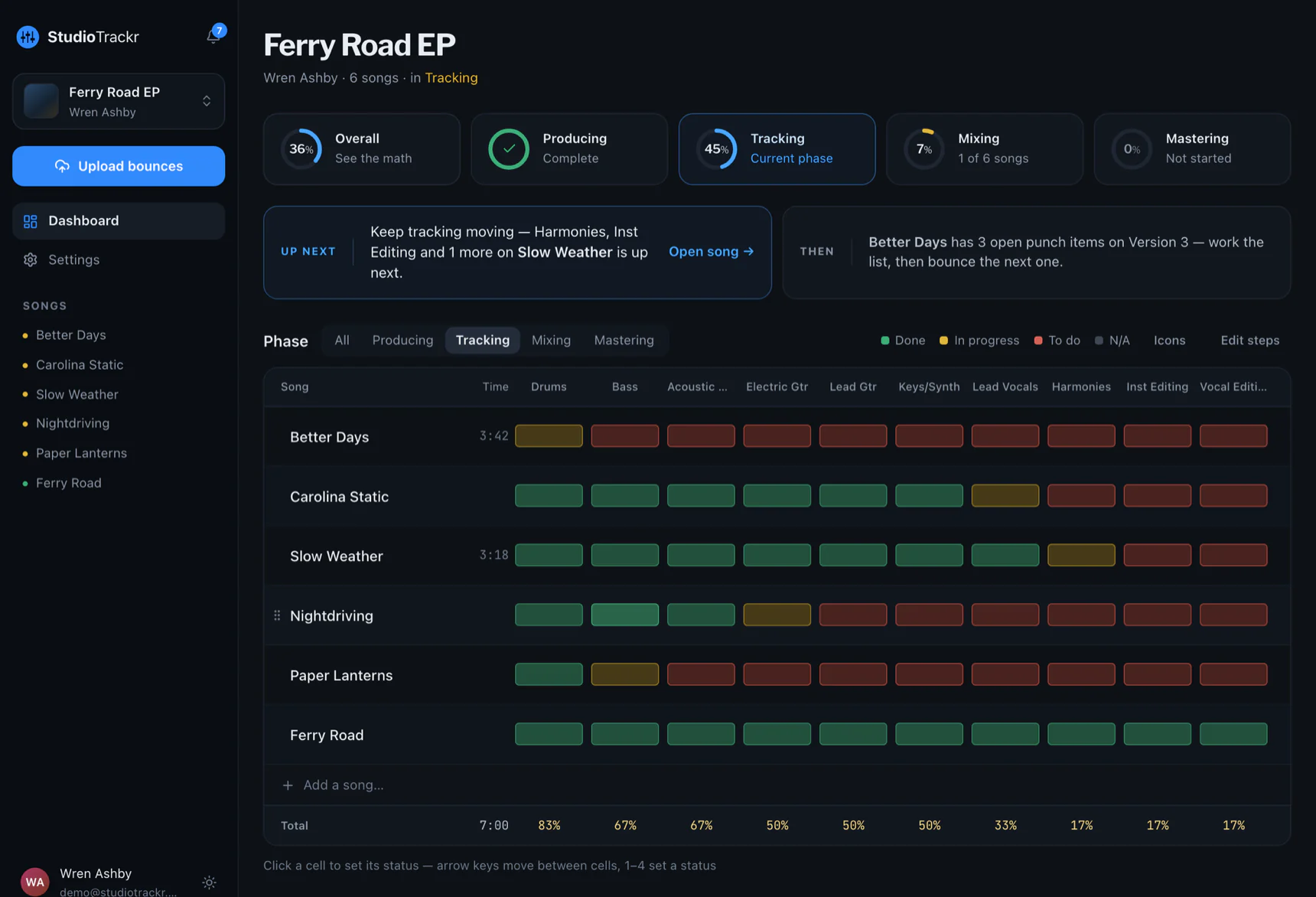
Songs down the side, steps across the top, a color for each status: green done, yellow in progress, red not started. This grid is the single most useful thing you can make for an album or EP. It turns "the album" from a feeling into a count, and it shows you which song is holding the rest up.
3. Finish one phase before starting the next
Finish tracking on every song before you start mixing any of them. It's tempting to mix the song you love while three others still need vocals, but mixing is where albums go to die: you can polish one song forever while the album stays at 40%. A phase you finish is progress nobody can take back.
4. Every session, scan and pick
When you sit down, look at the grid, find the red and yellow in the phase you're in, and work on that. Don't decide what to do tonight; let the board decide. A session that ends with one cell turning green was a good session.
5. Get every mix out of the room the same day
You can't judge a mix in the room you made it in. Bounce it, get it on your phone, and listen in the car, on a walk, on earbuds, the same day while the decisions are fresh. How to get mixes onto your phone →
6. Turn notes into a punch list
Every note you take while listening becomes one item on that song's list, with the time it's about: "1:42, vocal delay too long." Next session, work the list, resolve each item, and bounce again. Notes that live in a Notes app, a group chat or your head don't get fixed; notes on a list do. How to car-test a mix →
7. Put a ceiling on revisions
Decide in advance how many rounds a mix gets, three is plenty for most songs, and stop when the punch list is empty or the ceiling is reached. If a note survives three mixes, it's either not important or it's an arrangement problem, and neither one is fixed by a fourth mix.
8. Give the project a date
Book the mastering, or pick a release date and tell someone. A date turns "some day" into a schedule, and the board tells you whether you're on it.
Where StudioTrackr fits
StudioTrackr is this system as an app. You pick the steps when you create the project, the Studio Board is the grid, progress counts itself, Up Next tells you what finishes the phase you're in, every bounce lands on your phone as the song's next version, and every note sits on the song's punch list at the second it's about. It works for a solo project and for a band: invite everyone, and they see the same board.
The Free plan runs a whole EP, one project of up to four songs, which is a good size for a first finished project.